Pages

Wednesday, October 23, 2013

What's new in ASP.Net 4.5 - Garbage Collector

There are a few improvements shipped with .Net Framework 4.5, but the first one that I would share some details with, is Garbage Collection. If you would like to read the basics of the Garbage Collection read this

There are some performance improvements in the Garbage Collection process, which I would like to discuss here. GC is always a process which consumes both memory and the processor a lot and it has always been a problem area for websites running under .Net because the process for ASP.Net applications is continuously running and a lot of users are requesting the content and thus creating many objects on the fly and many of those objects are supposed to be destroyed by the GC too often. 

Whenever GC is trying to clean up the memory. It consumes a lot of resources and the GC thread suspends the main website threads and thus the other resources have to wait for the cleanup process to complete before serving further requests of the users.
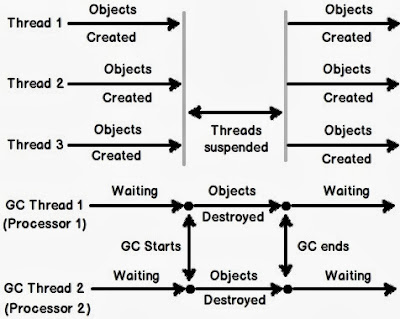

GC Model in .Net 4.0

Previously (in .Net 4.0), if we could simulate the GC Thread along with ASP.Net website threads. The picture should be something like this...


GC Model in .Net 4.0

As you can see in the above figure that whenever the two processes of GC run (one for each logical processor). The other threads have to wait for the cleanup process to complete before carrying on with the tasks, so user feels the processes to be less responsive while the garbage collector is running.

GC Model in .Net 4.5

Now (in .Net 4.5), the GC Thread takes less time and consumes lesser time, so that other threads are not suspended for longer periods

GC Model in .Net 4.5


Microsoft introduced new features in server GC for .Net 4.5 and as you can see in this figure, the server GC has introduced a new thread for Garbage Collector which is running in the background and is collecting objects from Generation 2, so the main application threads do not suspend much, thus increasing overall application performance. 

Enable Server GC in Config

To enable server GC in your application, you only have to add this to your configuration file.

Enable GC in Config


For any queries, please comment below...

References:

Tuesday, September 10, 2013

Inside Visual Studio - Search within

I often used to wonder why would Microsoft make life difficutl for the developers who want to do more with Visual Studio then just coding.

Well... Not any more...

Microsoft has now introduced the search within Visual Studio that would help any developer search within the properties and options of Visual Studio

Lets have a look...

In Visual Studio 2012. You have  a new search area on the top right corner, which shows the water mark text "Quick Launch (Ctrl + Q)"

As soon as you start typing something inside that water marked text box. You will be presented with options


Here you can have a look at the screenshot where I typed line number and the Visual Studio searched within its own options and preferences and came up with the options to show whether to enable or disable line numbers in the editor.

This search area not only searches within the options of the Visual Studio but different menu options of the visual studio as well, like this...


Well there is a lot more to explore. Lets jump into Visual Studio and start doing it ourselves...

Monday, September 26, 2011

Running totals in SQL Server

One of the most asked question of the age is the "running total problem" of SQL. When you have to generate a running total of a SQL Server table.


The Problem:
The problem which arrives is this that the user wants to calculate the running totals for a particular column in the database to be either used in a report or for reference to be stored in a column and used later on while querying the database.


Let us suppose the user has this kind of table....


ID
Date
Net Payment Due
Running Total
1
2011-08-19 12:23
10.17

2
2011-08-19 12:32
45.78

3
2011-09-14 15:03
6.80

4
2011-09-14 15:07
6.77

5
2011-09-17 11:14
0.00

6
2011-09-17 13:51
6.75

7
2011-09-19 10:27
4.25


The fourth column "RunningTotal" is what the user wants. He wants a running total of the corresponding payments defined over a period of time, so that he can easily see the Running Total of the Payments over a period of time.


The Solution:
There could be many solutions for this issue.
  • Modern day reporting tools give us the flexibility to calculate the running totals within the reports. This way the user won't have to calculate the running totals in the database.
  • Keep running totals in a Computed Column in a database and simply query that column whenever required.
  • Calculate the Running Totals in the same query whenever required.
First and the third scenarios are used when the user (in this case, the developer) only wants the running total to be calculated for a very few times and he would like to calculate the running totals only when is needed.

One should use the second case only when there is frequent need of the Running Total. The running total, thus would be stored in the database and the developer could access the running totals through a simple query of the column. As we all know, that computed columns have their drawbacks. I would strongly recommend to use the third solution.

The Options:
There are different options available for us to use when calculating running totals using SQL Server....

  1. Nested Sub Query
  2. Self Join
  3. Cursor
Let us see those options one by one...

1. Using Nested Sub Query:
We will use a sub query to calculate sub totals for a result set while fetching the result set in parallel. The query would be like this...

SELECT  ID ,
DataEntryDateTime ,
NetPaymentDue ,
NetPaymentDue + COALESCE((SELECT    SUM(NetPaymentDue)
 FROM      dbo.Payment b
 WHERE     b.id < a.ID
), 0) AS RunningTotal
FROM    dbo.Payment a

Here, the key to the solution is the little 'WHERE' clause, which is restricting only the previous rows to be fetched from the database. 


Note: If your ID is not the primary key, You need to add an 'ORDER BY' at the end of the outer query to sort out the results as well.


2. Using Self Join:
In this method we will use a 'JOIN' statement to join to the same table and will produce the same results. Here is how...


SELECT  a.ID ,
a.NetPaymentDue ,
SUM(b.NetPaymentDue)
FROM    dbo.Payment a
INNER JOIN dbo.Payment b ON (b.ID <= a.ID)
GROUP BY a.ID , a.NetPaymentDue
ORDER BY a.ID , a.NetPaymentDue


If you want the 'Date' column to appear in the select list as well, you will have to put the above query in the sub-query and join to the same table one more time to do it...


3. Using Cursor:
The third option is to use the cursor, which (to me) seems to be the best possible solution for this kind of problem. This also proves the point that cursors are not always slow... :-)


DECLARE @TempTbl TABLE
(
ID SMALLINT ,
NetPaymentDue MONEY ,
RunningTotal MONEY
)
 
DECLARE @ID SMALLINT ,
@NetPaymentDue MONEY ,
@RunningTotal MONEY
 
SET @RunningTotal = 0
 
DECLARE rt_cursor CURSOR
FOR
SELECT ID, NetPaymentDue
FROM dbo.Payment
ORDER BY ID
 
OPEN rt_cursor
 
FETCH NEXT FROM rt_cursor INTO @ID, @NetPaymentDue
 
WHILE @@FETCH_STATUS = 0 
BEGIN
SET @RunningTotal = @RunningTotal + @NetPaymentDue
INSERT  @TempTbl
VALUES  (@ID, @NetPaymentDue, @RunningTotal)
FETCH NEXT FROM rt_cursor INTO @ID, @NetPaymentDue
END
 
CLOSE rt_cursor
DEALLOCATE rt_cursor
 
SELECT  *
FROM    @TempTbl
Like the post.... Give it a Kick...... kick it on DotNetKicks.com

Monday, September 5, 2011

Major reasons for software failure

There are often the cases, when the software is not shipped on time or even if it is shipped, it is not shipped with the quality that is expected of it, resulting in an eventual failure of the project.


A research conducted by market research firm Info-Tech Research Group says 95 per cent of information technology groups "are not delivering some number of projects on time or to the full satisfaction of the business executive."


While there may be many reasons for this, the major reasons involve the following:


Poorly defined scope:
In most of the cases, the reason is not the clarification of the requirements.

  • It may be because of an unreasonable deadline from sales/management
  • It may be due to overlooking the customer's expectations or it could have been preconceived notions from the start
  • It could have been a developer promising a particular UI widget (The "gee whiz" factor) or it could have been a developer not challenging the inclusion of a particular UI widget (which, the customer, wants desperately)
  • It could be that the projected savings were wrong or it could be that an important scope change was delayed until the next version
In the end, it all boils down to the user/customer expectations regarding a software. If you have met the customer's requirements, you have a successful software.

My friend, Hassan, has a very good post here, regarding the requirements gathering of a software project which can be a good reading source.

Unmotivated Developers:
In some of the cases, the software failure arrives because of a lack of interest or respect towards the software from some or whole of the development team. It may be due to the following reasons...
  • Development team is not motivated enough for the project
  • The hype against the project is not created before the arrival of the project to keep the team thinking about the project
  • Lack of interest from the authorities/management in the project sometimes result in the lack of interest from the development team
Lack of Domain Knowledge:
Sometimes, it is the case when developers are assigned tasks and they have not enough knowledge about the project or about the organization for which they are developing the project.
  • One of the reason could be that the development team has not been given much time to do R & D for the project
  • The development team hired for the project has not enough background experience for related developments
  • The development team hired for the project is incompetent for producing the goods on time
In the end, I think it all concludes to the fact that the customer satisfaction is the first and fore-most thing and all the above factors contribute to the satisfaction (or dissatisfaction) of the customer. 

As a project manager, we must look into these factors before going ahead for the development of the project.

We can minimize the risks mentioned above by doing the following simple tasks:
  1. Focus on features not implementation tasks.
  2. Work in iterations (like weekly or biweekly).
  3. Release working features to your staging environment in order of priority.
  4. Unit test your code as you go, so you're not slowed down by a bug-list that increases geometrically as you approach the release date.
  5. Be prepared to cut scope from the less important features. Stuff always takes longer than you think it will.
  6. Make sure you sketch out the UI in advance (if there is a UI), and show it to potential users.
  7. Test, test, and test some more. This seems counter-intuitive, but it saves more time than takes.

Thursday, December 23, 2010

Deployment Windows 2003 IIS Problem 404 Error

This is a normal problem with Deployments, whenever people deploy their ASP.Net application on windows 2003 server. They face this problem. A 404 (Page Not Found) Error is shown.

This error normally arise when the sequence of installation is wrong.

Following steps must be taken to prevent the error to arise:

  1. make sure that the asp.net is registered with the IIS. You can register the asp.net with the IIS using aspnet_regiis.exe using '-i' switch. The aspnet_regiis.exe is located at <%WIN%>\Microsoft.Net\Framework\ folder
  2. It is often seen that registering the asp.net with IIS has no effect on the error mentioned above. In that case, you must make sure that the corresponding version in the Web Service Extensions in the IIS Manager is marked as 'Allowed'.
You can achieve this by doing the following steps:
  • Point to Start -> Run
  • Type inetmgr and then press enter. This will open the IIS Console on the server
  • Expand the server node and then click the 'Web Service Extensions' folder
  • Make sure that the corresponding ASP.Net version in the right pane is marked as 'Allowed'.
  • If not, select the corresponding version of asp.net in the right pane and click 'Allow' button.
Now try browsing the website again. It should run as a charm.