Along with some other awesome features of VS 2013. One of my favorites is peek definition.
This feature should have been a part of Visual Studio since day one, but since it was not there, no one really asked about it.
So here is how it really works.
In the previous versions of Visual Studio we had to use the "Go to Definition (F12)" menu option on the right click menu or the context menu to view the code of some other function, but the problem with it was that the current view was updated and the developer had to track back to the previous location using 'CTRL' + '-' key or maybe closing the file in case the function was in another file
Now VS 2013 gives an option to peek into the definition of another function by opening another smaller window on top of the current code editor window to peek into the code.
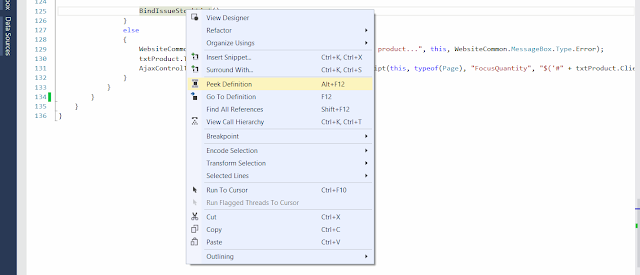

This feature should have been a part of Visual Studio since day one, but since it was not there, no one really asked about it.
So here is how it really works.
In the previous versions of Visual Studio we had to use the "Go to Definition (F12)" menu option on the right click menu or the context menu to view the code of some other function, but the problem with it was that the current view was updated and the developer had to track back to the previous location using 'CTRL' + '-' key or maybe closing the file in case the function was in another file
Now VS 2013 gives an option to peek into the definition of another function by opening another smaller window on top of the current code editor window to peek into the code.


Here, the developer can not only view the function but can also see other functions in the same code file by scrolling up and down in the same code file. A developer can also do all sorts of tasks that one can think of in a code editor window, because it is a fully functional code editor window itself.
The developer can get rid of that window by simply pressing the "escape" key.

